

Productivity in 2026 is no longer about managing scattered to-do lists across disconnected apps. It is about building an integrated system that reduces mental load, automates routine decisions, and supports remote collaboration without friction. Over the years, I have noticed that the biggest productivity gains rarely come from working longer hours. They come from choosing the right tools and designing workflows intentionally.
In this guide, I will break down the best productivity apps in 2026, including AI-powered platforms, project management tools for freelancers, free project management tools, and apps for remote work. This is not a shallow roundup. We will look at how these tools function, who they are best suited for, and which features actually matter.
What Makes a Productivity App Worth Using in 2026
Before recommending any specific platform, it is important to define what separates average tools from high-leverage systems. Many apps still advertise long feature lists, but without intelligent automation or workflow cohesion, those features create complexity rather than clarity.
The best productivity apps in 2026 share several traits. They integrate AI meaningfully, support cross-device synchronization, enable asynchronous collaboration, and allow workflow customization without requiring technical expertise. Most importantly, they reduce cognitive friction. A tool should not feel like another task to manage.
When evaluating top productivity tools, I focus on whether they eliminate repetitive administrative effort, whether they scale with growth, and whether they simplify decision-making rather than complicate it.
Best AI-Powered Productivity Apps in 2026
Artificial intelligence is no longer a novelty inside productivity software. In 2026, it is embedded directly into task management, documentation, scheduling, and reporting. The tools below stand out because their AI improves execution rather than distracting from it.
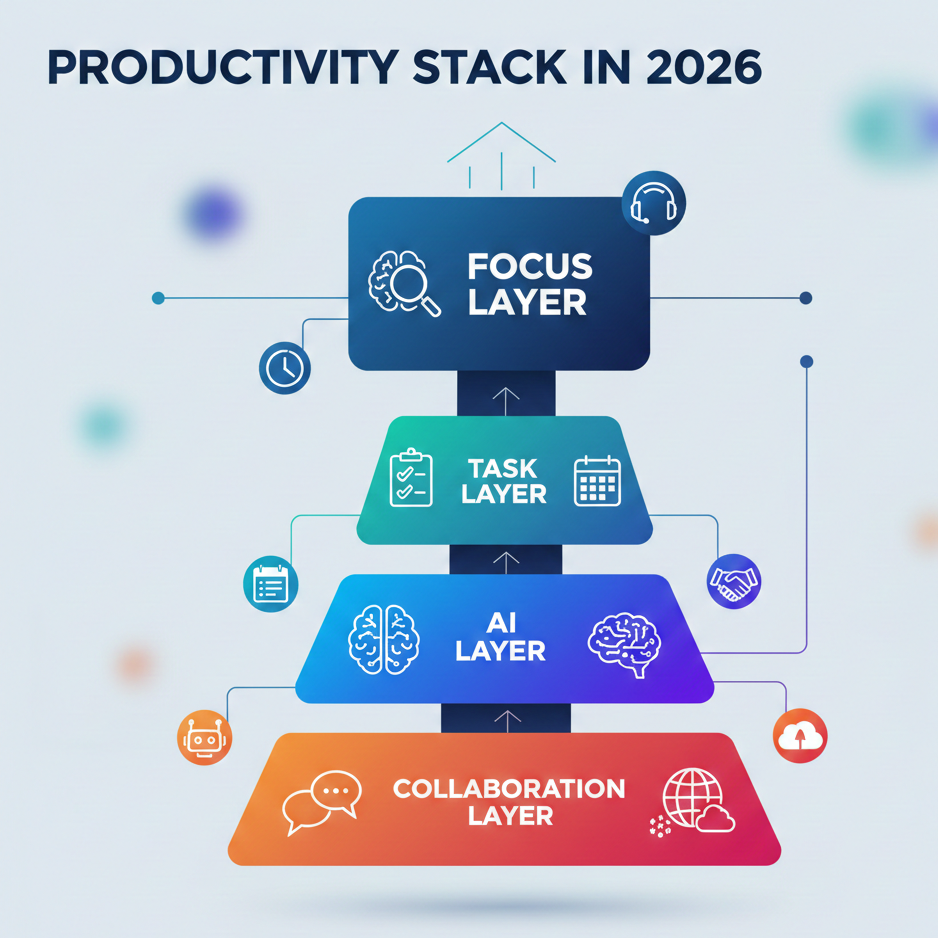
Notion AI
Notion has evolved from a flexible note-taking tool into a full productivity operating system. It allows users to build custom dashboards, project trackers, knowledge hubs, and content workflows inside one unified workspace. Its strength lies in adaptability.
What makes Notion powerful this year is how AI integrates across the system. Instead of opening a separate AI tool, users can generate summaries, draft content, analyze meeting notes, and create structured task lists directly within their workspace.
Key features include:
- AI-powered content drafting and summarization
- Relational databases for linking tasks, projects, and documents
- Custom dashboards tailored to client or team workflows
- Real-time collaboration with comments and mentions
- Template libraries for faster setup
- Integrations with Slack, Google Drive, GitHub, and other platforms
For freelancers, Notion can function as a client portal, content calendar, and project management system simultaneously. For remote teams, it becomes a central knowledge repository that reduces repetitive questions. The learning curve can be moderate, but once structured properly, it becomes one of the best productivity apps in 2026 for long-term scalability.
ClickUp AI
ClickUp has positioned itself as one of the most comprehensive project management tools available, especially for freelancers and growing teams. It combines task tracking, documentation, time management, and automation inside one ecosystem.
Its AI assistant enhances workflow efficiency by generating task descriptions, summarizing updates, and helping users break down complex deliverables. However, ClickUp’s true strength lies in its customization depth.
Core features include:
- Custom task statuses and workflow structures
- Multiple project views including list, board, calendar, and Gantt
- Built-in time tracking for client billing
- AI-generated task summaries and updates
- Goal tracking and OKR dashboards
- Automation triggers based on status changes and deadlines
- Permission-based access for client collaboration
For those searching specifically for project management tools for freelancers, ClickUp offers flexibility that adapts to different industries. Its free tier also makes it one of the strongest free project management tools available today, especially for solo professionals building structured workflows.
Motion
Motion approaches productivity from a scheduling-first perspective rather than a task-first one. Instead of manually assigning tasks to time blocks, it dynamically schedules them using AI based on deadlines and priority levels.
This approach is particularly useful for entrepreneurs and freelancers juggling multiple commitments. When priorities change, the system automatically reorganizes the calendar, removing the need for constant manual adjustments.
Important features include:
- AI-driven dynamic scheduling
- Automatic task reprioritization
- Meeting time optimization
- Deadline conflict detection
- Time-blocked daily planning
- Team visibility for shared schedules
Motion is less about detailed project management and more about execution discipline. For individuals who struggle with time allocation, it can significantly reduce decision fatigue.
Best Project Management Tools for Freelancers in 2026
Freelancers need productivity systems that balance simplicity with scalability. Unlike enterprise teams, they require tools that separate client projects clearly, track time efficiently, and avoid unnecessary complexity.
Trello
Trello remains one of the most accessible project management tools for freelancers because of its visual simplicity. Its Kanban-style boards allow tasks to move fluidly from planning to completion without overwhelming configuration.
Although simple, Trello still provides meaningful functionality.
Its key features include:
- Drag-and-drop Kanban boards
- Custom labels and due dates
- Checklists within task cards
- Automation rules through Butler
- Integrations with Google Drive, Slack, and Dropbox
- Power-Ups to extend capabilities
For freelancers managing a moderate number of active clients, Trello’s free version remains highly effective. It may lack advanced reporting, but it excels at clarity and ease of use.
Asana
Asana is built for structured execution and works well for freelancers handling recurring or deadline-sensitive deliverables. It provides a more formal workflow structure compared to Trello.
Asana’s core strengths include:
- Timeline view for deadline visualization
- Task dependencies for sequencing work
- Workflow automation rules
- Milestone tracking
- Portfolio-level project oversight
- Workload balancing across team members
- Advanced reporting dashboards
For freelancers planning to scale into agencies, Asana offers the structure necessary for growth. It bridges the gap between lightweight boards and enterprise systems.
Todoist
Todoist focuses on simplicity and speed, making it ideal for solo freelancers who want daily execution clarity without complex reporting systems. Its minimalist interface encourages consistent use.
Its feature set includes:
- Natural language task entry
- Recurring task automation
- Priority labeling
- Basic Kanban and list views
- Cross-platform synchronization
- Productivity tracking metrics
While not a full-scale project management platform, Todoist works well for independent professionals who value focus over complexity.
Quick Comparison Table: Best Productivity Apps in 2026
| Tool | Best For | Category | Free Plan | AI Features | Ideal User Type |
|---|---|---|---|---|---|
| Notion | Knowledge management & flexible workflows | AI Productivity / Workspace | Yes | Yes | Freelancers, creators, remote teams |
| ClickUp | Structured project management | Project Management | Yes | Yes | Freelancers, agencies, growing teams |
| Motion | Automated scheduling & time blocking | AI Scheduling | No (Trial) | Yes | Entrepreneurs, solo professionals |
| Trello | Simple visual task tracking | Project Management | Yes | Limited | Freelancers, small teams |
| Asana | Structured deadline-based workflows | Project Management | Yes | Limited | Agencies, remote teams |
| Todoist | Personal task management | Task Manager | Yes | No | Solo freelancers, students |
| Slack | Team communication | Remote Work / Collaboration | Yes | Limited | Remote teams |
| Loom | Async video communication | Remote Work / Communication | Yes | No | Remote teams, managers |
| Miro | Visual collaboration & brainstorming | Remote Work / Collaboration | Yes | Limited | Creative teams, strategists |
| Freedom | Distraction blocking | Focus Tool | No (Trial) | No | Remote workers, deep work users |
| RescueTime | Time tracking & behavior analytics | Focus / Analytics | Yes | No | Professionals optimizing efficiency |
| Forest | Gamified focus sessions | Focus Tool | Yes (Mobile) | No | Students, solo professionals |
Best Free Project Management Tools in 2026
Interest in free project management tools continues to rise, especially among students, new freelancers, and bootstrapped startups. Fortunately, several platforms provide meaningful features without requiring immediate upgrades.
Trello’s free plan supports multiple boards and automation rules, making it ideal for individuals. ClickUp’s free version includes unlimited tasks and multiple project views. Notion’s free plan allows comprehensive workspace creation for solo users. Asana’s basic plan supports small teams with structured task management.
The key consideration when selecting a free tool is scalability. Many free plans limit advanced integrations or reporting features, so users should evaluate future growth needs before committing.
Best Productivity Apps for Remote Work
Remote work in 2026 emphasizes asynchronous communication and transparent workflows. The best productivity apps for remote work reduce unnecessary meetings and centralize collaboration.
Slack functions as a structured communication hub rather than just a chat tool. Its channel organization and integrations turn conversations into actionable workflows.
Slack’s capabilities include:
- Channel-based messaging
- Threaded discussions
- Workflow automation
- Voice and video calls
- Searchable message history
- App integrations with project tools
Loom enhances asynchronous updates through video messaging. Instead of scheduling meetings, teams can share visual explanations instantly.
Loom offers:
- Screen and camera recording
- Shareable video links
- Viewer analytics
- Comment threads on videos
- Basic editing tools
Miro supports visual brainstorming and distributed planning sessions.
Its primary features include:
- Infinite collaborative whiteboards
- Template libraries for roadmaps and strategy
- Real-time cursor collaboration
- Voting and sticky note tools
- Integration with project management platforms
Together, these tools form a strong remote productivity ecosystem.
Best Focus and Deep Work Apps
Managing tasks is only part of productivity. Protecting attention is equally important, especially in remote environments filled with digital distractions.
Freedom blocks distracting websites and apps across devices.
Its features include:
- Scheduled focus sessions
- Cross-device synchronization
- Custom block lists
- Locked mode for discipline
RescueTime focuses on behavioral analysis.
It provides:
- Automatic time tracking
- Productivity scoring
- Website categorization
- Detailed performance reports
- Focus session timers
Forest encourages sustained attention through gamified sessions that reward consistency.
How to Choose the Right Productivity App
Choosing among the best productivity apps in 2026 requires self-assessment. A freelancer managing three clients has different needs than a remote team of twenty. The right system should align with workload complexity, collaboration requirements, and budget.
If simplicity is the priority, Trello or Todoist may be ideal. If structured growth and reporting matter, ClickUp or Asana may be more appropriate. If time management is the biggest challenge, Motion can provide significant value.
The goal is not to stack as many tools as possible. It is to build a cohesive system that reduces friction and increases consistency.
Pingback: Notion vs Evernote: Which Is Better for Productivity? - copyescape.com
Pingback: 18 Work From Home Setup Ideas to Create a Productive Workspace in 2026 - Copyescape